


-
Delivery information
Free shipping at 100€ within Germany*
Shipping costs and delivery

-
Payment options

Free shipping at 100€ within Germany*
Shipping costs and delivery
Here you will find answers to the most common questions about ordering, quotes and shipping. Can't find what you are looking for? Write to us at info@lebkuchen-markt.de – we are happy to help.
Placing an order takes four steps. The step you are on is shown above the form – use that bar to jump back to a step you have already filled in and change your details.
You then get a confirmation page, plus an order confirmation by email.
Shipping costs are added to every order. You will find the current rates on our shipping costs page. The following payment methods are available:
After ordering you receive our bank details and transfer the total amount. We ship as soon as the payment has reached us.
We accept Visa and Mastercard. You enter your card details directly in the last step of the order process – they are transmitted encrypted to our payment provider and are never visible to us. Depending on your card and bank you may then be asked by your bank to confirm the payment (3-D Secure). Please do not close the window during this process.
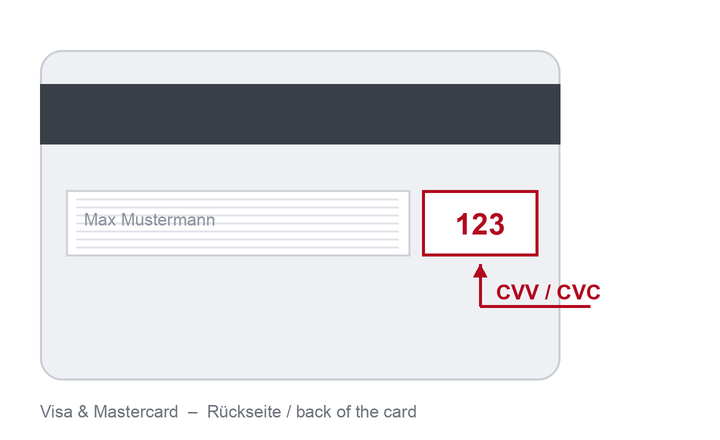
Where do I find the security code (CVV/CVC) on my card?
On Visa and Mastercard the three-digit security code is printed on the back, in the signature strip.
If you choose PayPal, the PayPal button replaces the usual order button in the final step. You sign in to PayPal and approve the payment there. Your order is only submitted once you have approved the payment in PayPal, so please do not cancel before that. The amount is transferred immediately, so we can start processing your order right away – usually faster than paying by bank transfer.
Payment on account is available to business customers under the following conditions:
You receive the invoice by email and pay conveniently after receiving the goods. Orders on account are reviewed individually.
For personalised products you can create a non-binding quote yourself at any time – as a PDF to save or print. Depending on whether you need one product or several, follow the matching guide below.
Please note: the video shows an earlier version of our shop. The steps are unchanged, only the appearance differs – the screenshots below show the current design. For full screen, watch it directly on YouTube.
Pick the product you want from the overview. Clicking the product opens its product page with all the details and customisation options.

On the product page, adjust the options to your liking – depending on the product these include border colour, decoration, your own text or the type of packaging. The unit price updates automatically as you go.

Enter the quantity you need and click Create offer. Your personal quote opens and can be printed directly or saved as a PDF.

Please note: the video shows an earlier version of our shop. The steps are unchanged, only the appearance differs – the screenshots below show the current design. For full screen, watch it directly on YouTube.
Choose and customise each product as described in steps 1 and 2 of the guide for one product.
Enter the quantity you need and click Add to Cart. Repeat this for every further product.

In the cart you can adjust your selection at any time: Edit changes a line, Delete removes it. Then click Create offer – you receive one quote covering every line, ready to print or save as a PDF.

You can work out international shipping costs directly in the shopping cart – without placing an order and without a customer account:
Please note: the video shows an earlier version of our shop. The steps are unchanged, only the appearance differs – the screenshot below shows the current design. For full screen, watch it directly on YouTube.


